

Introduction
Devin is an AI software engineering agent that can take a development task, work through multiple steps, use tools, and help build or update applications inside its workspace.Why use Tavily with Devin?
Tavily helps Devin go beyond its built-in knowledge when a task depends on the current web.- Research before coding — Compare libraries, frameworks, and services before implementation.
- Read docs faster — Pull clean content from relevant pages instead of relying on noisy web pages.
- Ground implementation choices — Use live sources when picking packages, SDKs, or workflows.
- Handle multi-step engineering tasks — Search, extract, and research can all happen in the same coding flow.
Example use case
Ask Devin to add email support to a product using the best current provider for your stack. With Tavily enabled, Devin can search for recent comparisons of Resend, Postmark, and SendGrid, read the latest integration docs, choose an option that fits your app, implement the flow, and document the setup in your README.Full walkthrough
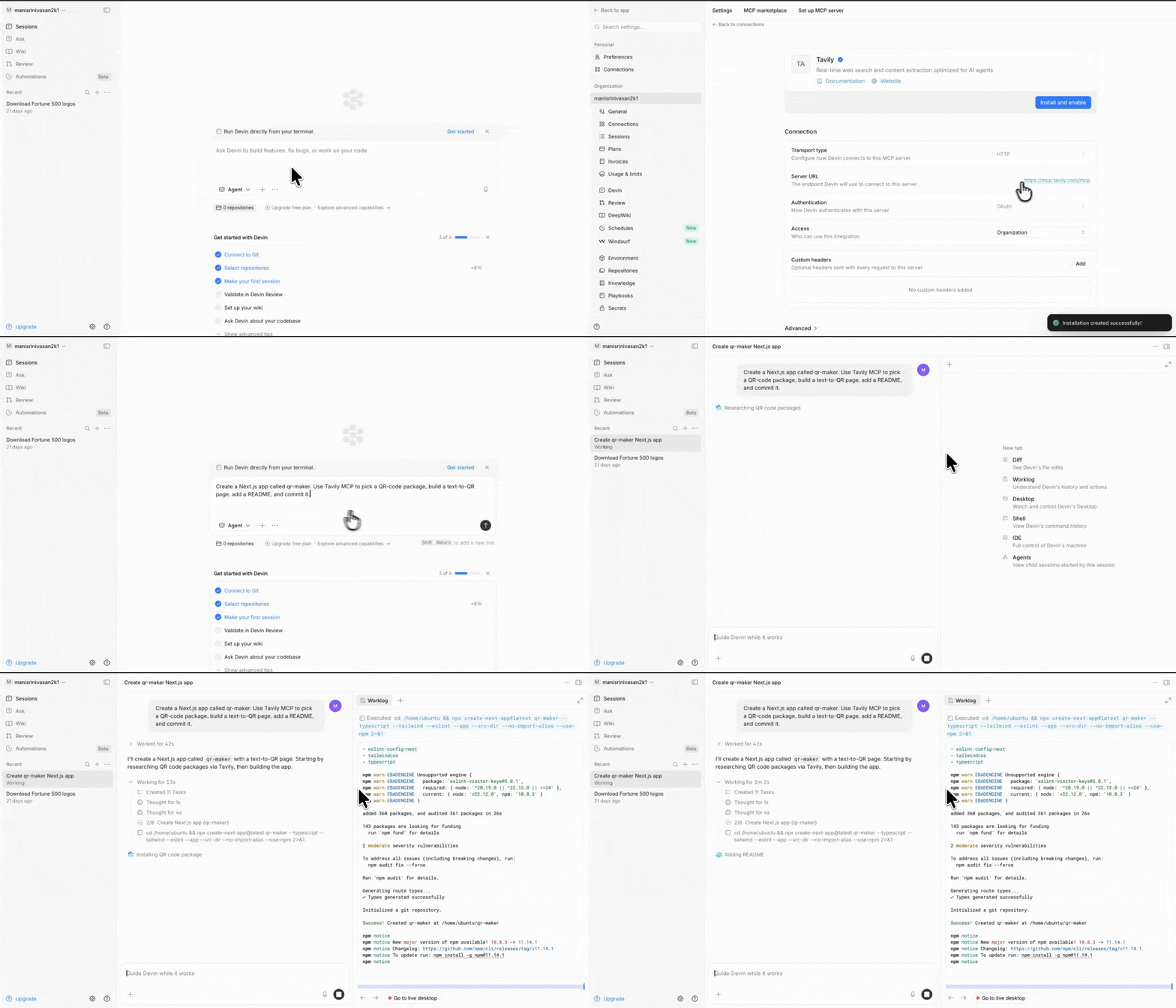
Setup
Follow this flow in Devin:Step 1: Open Devin
Step 1: Open Devin
Go to app.devin.ai.
Step 2: Open settings
Step 2: Open settings
Click your username and open the Settings dropdown from the left panel.
Step 3: Open Connectors
Step 3: Open Connectors
In Settings, click Connectors.
Step 4: Open the MCP Marketplace
Step 4: Open the MCP Marketplace
Inside Connectors, open MCP Marketplace.
Step 5: Search for Tavily and enable it
Step 5: Search for Tavily and enable it
Search for Tavily, then click Add, Install, and Enable.
Step 6: Optionally test the tools
Step 6: Optionally test the tools
Click Test tools if you want to verify the integration before using it in a task.
Usage
Once Tavily is enabled:- Go back to the main Devin app.
- Start a new task.
- Ask Devin to use Tavily MCP as part of the workflow.
Good tasks for Devin + Tavily
- choosing between actively maintained packages
- implementing against the latest API or SDK docs
- reading framework migration guides
- comparing current tooling options before coding
- gathering source material before writing code or documentation