

Documentation Index
Fetch the complete documentation index at: https://docs.tavily.com/llms.txt
Use this file to discover all available pages before exploring further.
Introduction
Claude is Anthropic’s AI assistant designed for reasoning, coding, and research workflows across multiple environments like Claude Desktop, claude.ai, Claude Code, and Claude Cowork. With Connectors, Claude can securely integrate with external tools using MCP (Model Context Protocol), enabling real-time data access and extended capabilities.Tavily + Claude
Tavily integrates with Claude as an official connector, giving Claude access to:- Real-time web search
- Content extraction from URLs
- Website crawling and mapping
- Deep research workflows
Supported Claude surfaces
Tavily works across the Claude ecosystem:- Claude Cowork
- Claude Code - Through Claude Desktop, Alternatively if you want to use Tavily through Claude Code terminal, follow this.
- claude.ai
- Claude Desktop
Installation
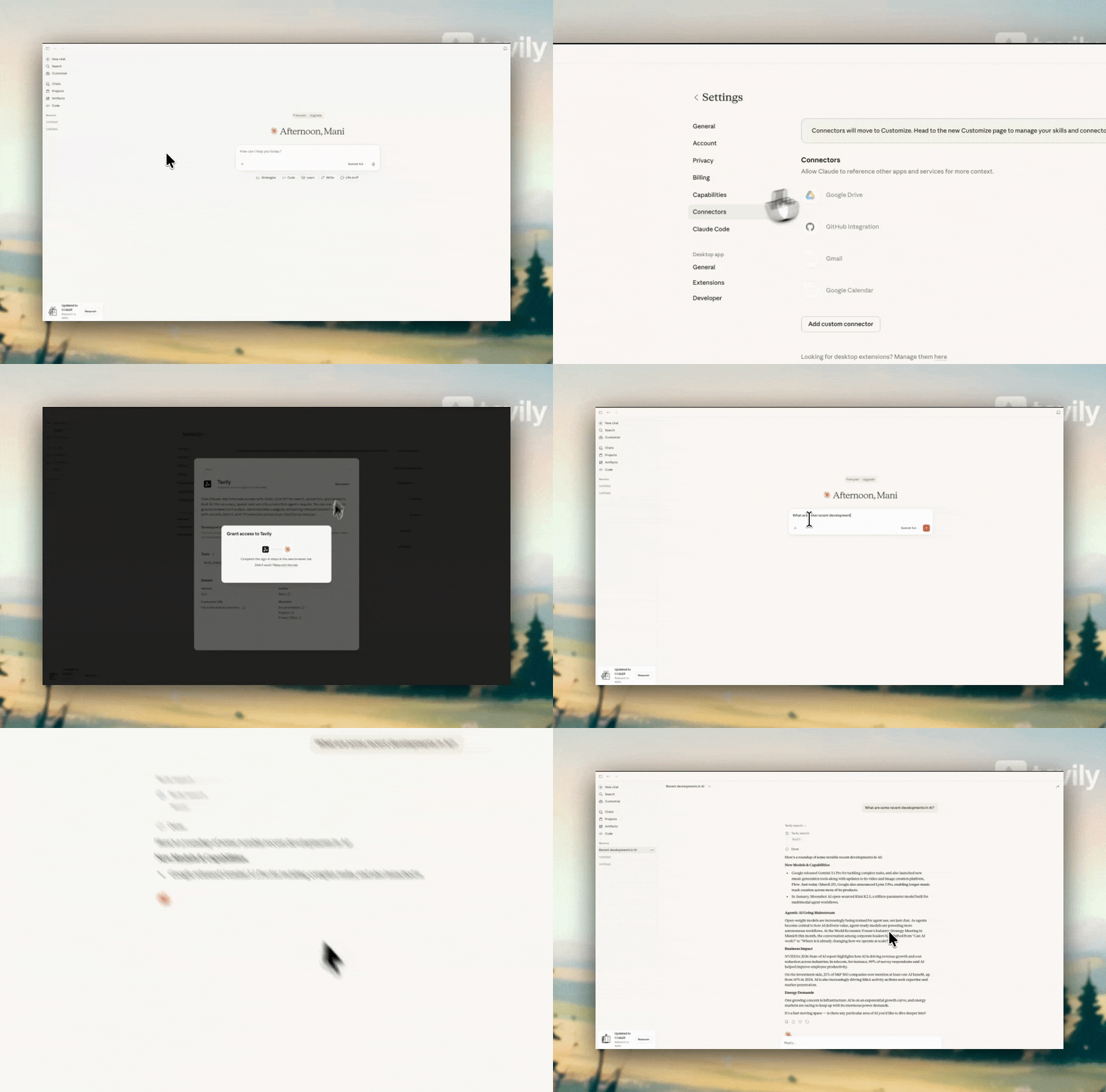
Step 1: Open Claude settings
Step 1: Open Claude settings
Go to Settings inside Claude.
Step 2: Navigate to Connectors
Step 2: Navigate to Connectors
Step 3: Add Tavily
Step 3: Add Tavily
Search for Tavily and click the + (Connect) button.
Step 4: Authenticate via OAuth
Step 4: Authenticate via OAuth
Complete the OAuth flow to connect Tavily.
Step 5: Configure permissions
Step 5: Configure permissions
After connecting, go to Configure and enable Allow always (recommended).This allows Claude to automatically use Tavily whenever web search or external data is needed.
Tavily tools available
| Tool | Description |
|---|---|
| tavily_search | Real-time web search |
| tavily_extract | Extract clean content from URLs |
| tavily_crawl | Crawl multiple pages from a site |
| tavily_map | Discover site structure and URLs |
| tavily_research | Multi-step deep research workflows |
| tavily_skill | Search the best skills for your agent |
How Tavily works inside Claude
Once connected, Tavily runs automatically inside Claude:- Claude detects when external data or web search is needed
- Tavily tools are invoked automatically
- Results are returned and used in Claude’s response
Example use cases
tavily_search
Query:“What are the latest updates in AI this week?” What happens:
Claude identifies this as a real-time information request and calls
tavily_search.
- Tavily fetches recent news, blogs, and updates
- Claude selects the most relevant sources
- Results are synthesized into a concise summary
A current, source-backed overview of the latest AI developments.
tavily_extract
Query:“Summarize this article: https://example.com/ai-report” What happens:
Claude detects a URL and calls
tavily_extract.
- Tavily extracts clean content from the page
- Removes boilerplate (ads, navigation, etc.)
- Returns structured text
A clean, accurate summary of the article without noise.
tavily_crawl
Query:“Go through Stripe’s documentation and explain how subscriptions work” What happens:
Claude needs multiple pages to answer this.
- Calls
tavily_crawlon the documentation root - Tavily traverses linked pages
- Relevant pages are collected and processed
A complete answer built from multiple documentation pages.
tavily_research
Query:“Do a deep analysis of the AI chip market and key players” What happens:
Claude recognizes this as a complex, multi-step research task.
- Calls
tavily_research(deep research agent) - Tavily performs multi-source search, extraction, and synthesis
- Iteratively refines findings across sources
A comprehensive, multi-source analysis rather than a simple summary.
Learn more
- Claude Connectors Directory - https://claude.com/connectors
- Use Tavily with Anthropic SDK - https://docs.tavily.com/documentation/integrations/anthropic