

tavily_search, tavily_extract, tavily_crawl, tavily_map, tavily_research). Every surface shares the same MCP config.
Remote MCP server (recommended)
Install Kilo and get a Tavily API key.1
Add the server
Add Tavily under the
mcp key in your Kilo config. Use ~/.config/kilo/kilo.jsonc for all projects, or .kilo/kilo.jsonc in a project to scope it. The project file overrides the global one.~/.config/kilo/kilo.jsonc
2
Authenticate
Open the MCP servers list in Kilo’s settings and click Sign in next to
tavily, or run kilo mcp auth tavily in the CLI. Then sign in to Tavily in your browser. If Kilo doesn’t pick up the new config, restart it.3
Try it
In Kilo chat, ask:
Use Tavily to find the official documentation for numpy.Approve the tool call. Tavily tool calls and source links in the response confirm it worked.
Use an API key
To skip OAuth, send your key in anAuthorization header and set "oauth": false. Kilo reads {env:TAVILY_API_KEY} from the environment it starts in, so set the variable before you launch Kilo.
Keyless access
For limited Search and Extract access without signing in, connect through themcp-remote bridge, which sends the keyless header. It requires Node.js. See keyless access for limits and supported tools.
Install from the Marketplace
In the IDE extensions and Kilo Desktop, you can install Tavily from the UI instead of editing the config. In VS Code and other VS Code forks, open the Kilo sidebar first, then Kilo settings. In Kilo Desktop, open Settings.1
Find Tavily
Go to Agent Behaviour → MCP Servers, click Browse Marketplace, and search for Tavily.
2
Install
Choose whether Tavily is available to this project or global, keep the NPX installation method, and enter your Tavily API key. Click Install and Kilo writes the server to your MCP config.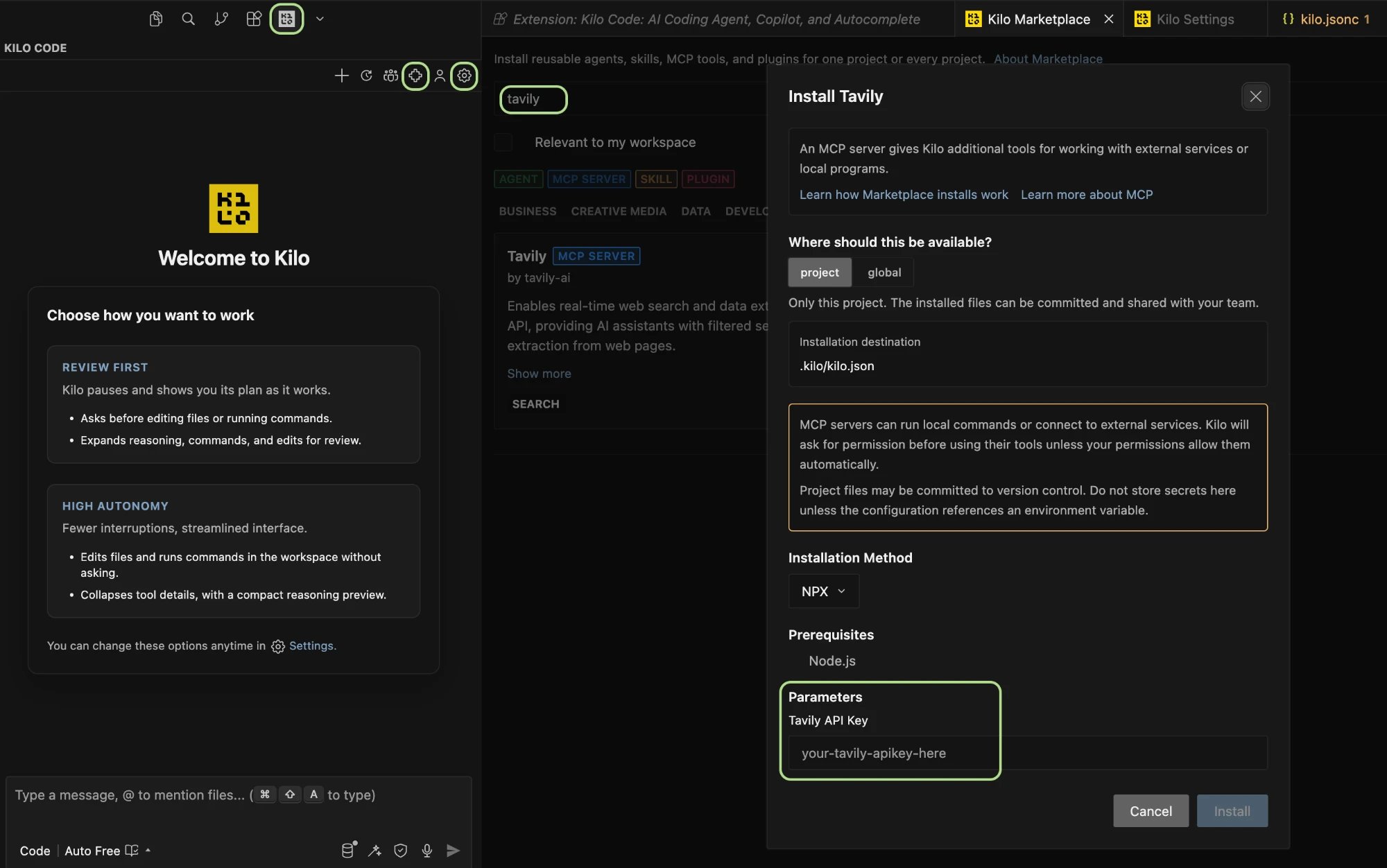
Kilo stores the key in the config file it writes. A project install writes
.kilo/kilo.json, so don’t commit that file, or choose global instead. To sign in with OAuth and keep your key out of the file, use the remote server above.Local MCP server
Run the Tavily MCP package locally. It still calls Tavily’s API.1
Set your API key
Install Node.js 20 or later and set
TAVILY_API_KEY in your environment.2
Add the server
Add this to your Kilo config.
3
Verify
Confirm
tavily-local shows as connected in Kilo’s MCP servers list, or run kilo mcp list.Kilo CLI
The Kilo CLI reads the same config files, so the setups above work unchanged. You can also add the remote server from the command line, then sign in:list shows whether tavily is connected or needs authentication. To switch Tavily accounts, run kilo mcp logout tavily, then kilo mcp auth tavily again. If sign-in fails, kilo mcp debug tavily traces the OAuth connection.
Example usage
Use Tavily to find three recent changes in this project’s main framework. Summarize the ones that affect our code and link each source.
Use Tavily to research how other open-source projects structure this pattern, then draft a plan for ours and cite the sources.
Troubleshooting
tavilyneeds authentication. Click Sign in in the MCP servers list, or runkilo mcp auth tavily. Restart Kilo if it still shows the old state.tavilyfails to connect. Runkilo mcp debug tavily, and check that the URL or command in your config is correct.- The API-key header is rejected. Check that
TAVILY_API_KEYis set in the environment Kilo starts from, then restart Kilo. - OAuth uses the wrong key. Tavily uses the key named
mcp_auth_default, so rename a key in the Tavily dashboard. See API key selection.