

Introduction
Every data science enthusiast knows that a vital first step to building a successful model or algorithm is having a reliable evaluation set to aspire to. In the rapidly evolving landscape of Retrieval-Augmented Generation (RAG) and AI-driven search systems, the importance of high-quality eval datasets is crucial. In this article, we introduce an agentic workflow designed to generate subject-specific dynamic evaluation datasets, enabling precise validation of web search augmented agents’ performance. Known RAG evaluation datasets, such as HotPotQA, CRAG, and MultiHop-RAG, have been pivotal in benchmarking and fine-tuning models. However, these datasets primarily focus on evaluating performance with static, pre-defined document sets. As a result, they fall short when it comes to evaluating web-based RAG systems, where data is dynamic, contextual, and ever-changing. This gap presents a significant challenge: how do we effectively test and refine RAG systems designed for real-world web search scenarios? Enter the Real-Time Dataset Generator for RAG Evals — an agentic tool leveraging Tavily’s Search Layer and the LangGraph framework to create diverse, relevant, and dynamic datasets tailored specifically for web based RAG agents.How does it work?
1
Input
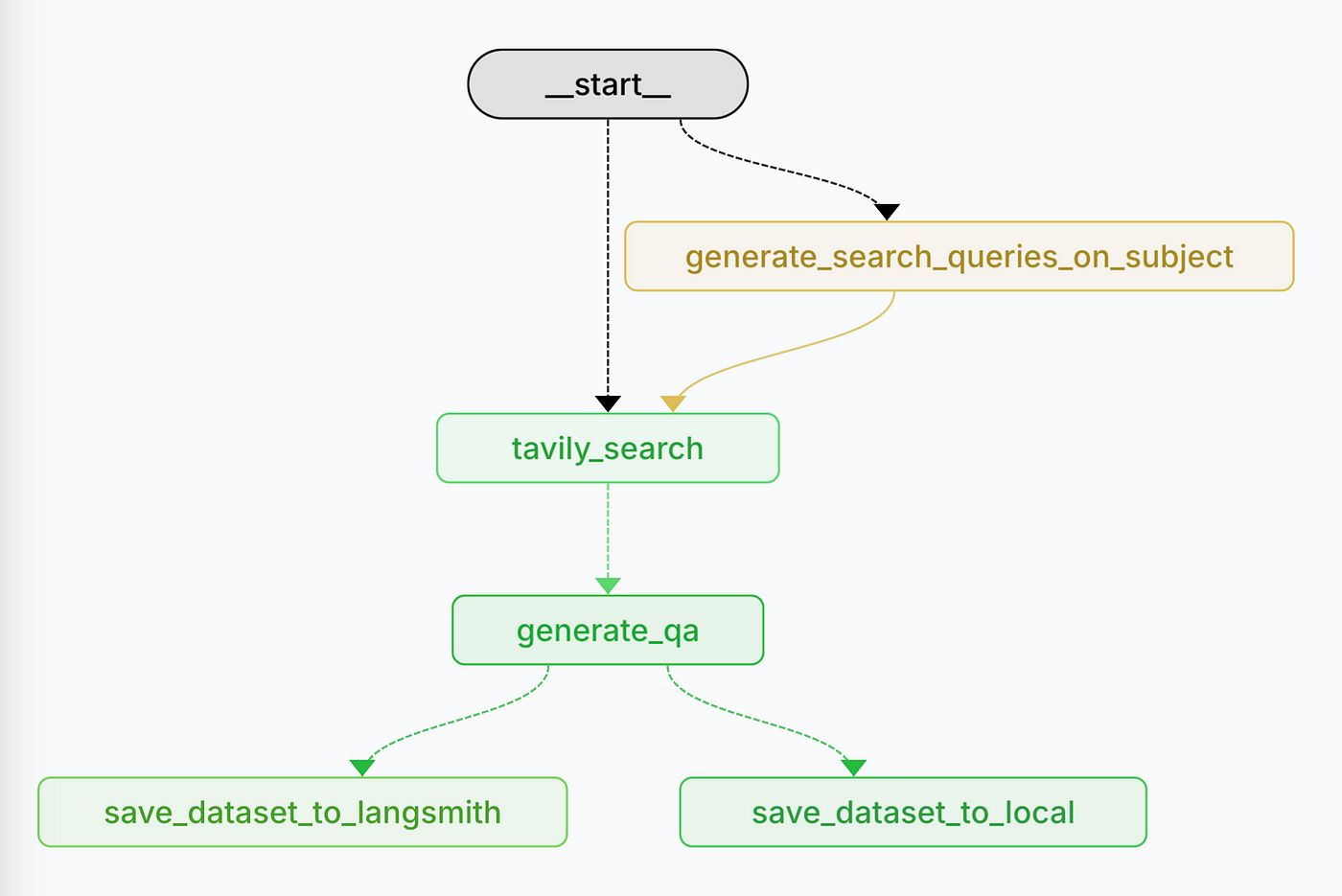
The workflow begins with user-provided inputs.
2
Domain-Specific Search Query Generation
If a subject is provided (e.g., “NBA Basketball”), the system generates a
set of search queries. This ensures queries are tailored to gather
high-quality, recent, and subject-specific information.
3
Web Search with Tavily
This step guarantees that the dataset reflects current and relevant
information, particularly for web search RAG evaluation, where up-to-date
data is crucial.This is the heart of the RAG Dataset Generator,
transforming queries into actionable, high-quality data that forms the
foundation of the evaluation set.
4
Q&A Pair Generation
For each website returned by Tavily, the system generates question-answer pair
using a map-reduce paradigm to ensure efficient processing across multiple
sources. This step is implemented using LangGraph’s Send API.
5
Saving the Evaluation Set
Finally, the generated dataset is saved either locally or to
Langsmith, based on the input configuration.
6
Output
The result is a well-structured, subject-specific evaluation dataset, ready for use in advanced evaluation methods like LLM-as-a-Judge.
Learn More
Want to dive deeper into web-based RAG evaluation? Check out these resources:Blog Post
Read our detailed blog post about generating dynamic RAG evaluation datasets
GitHub
/Eyalbenba/tavily-web-eval-generator