> ## Documentation Index
> Fetch the complete documentation index at: https://docs.tavily.com/llms.txt
> Use this file to discover all available pages before exploring further.
# Chat
> Build a conversational chat agent with real-time web search, crawl, and extract capabilities using Tavily's API
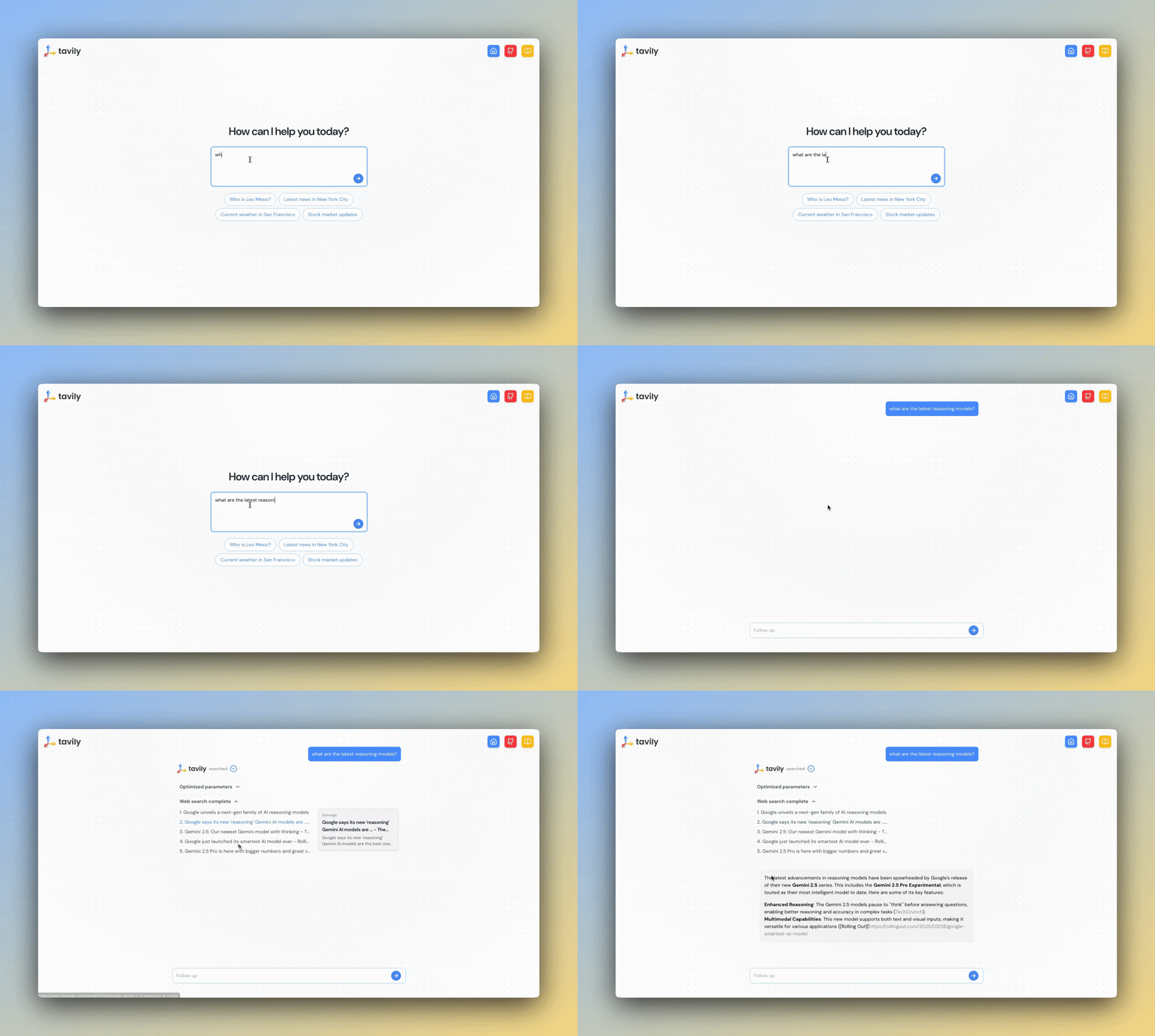 ## Try Our Chatbot
### Step 1: Get Your API Key
### Step 2: Chat with Tavily
### Step 3: Read The Open Source Code
## Features
1. **Fast Results**: Tavily's API delivers quick responses essential for real-time chat experiences.
2. **Intelligent Parameter Selection**: Dynamically select API parameters based on conversation context using LangChain integration. Specifically designed for agentic systems. All you need is a natural language input, no need to configure structured JSON for our API.
3. **Content Snippets**: Tavily provides compact summaries of search results in the `content` field, best for maintaining small context sizes in low latency, multi-turn applications.
4. **Source Attribution**: All search, extract, and crawl results include URLs, enabling easy implementation of citations for transparency and credibility in responses.
## How Does It Work?
The chatbot uses a simple ReAct architecture to manage conversation flow and decision-making. Here's how the core components work together:
## Try Our Chatbot
### Step 1: Get Your API Key
### Step 2: Chat with Tavily
### Step 3: Read The Open Source Code
## Features
1. **Fast Results**: Tavily's API delivers quick responses essential for real-time chat experiences.
2. **Intelligent Parameter Selection**: Dynamically select API parameters based on conversation context using LangChain integration. Specifically designed for agentic systems. All you need is a natural language input, no need to configure structured JSON for our API.
3. **Content Snippets**: Tavily provides compact summaries of search results in the `content` field, best for maintaining small context sizes in low latency, multi-turn applications.
4. **Source Attribution**: All search, extract, and crawl results include URLs, enabling easy implementation of citations for transparency and credibility in responses.
## How Does It Work?
The chatbot uses a simple ReAct architecture to manage conversation flow and decision-making. Here's how the core components work together:
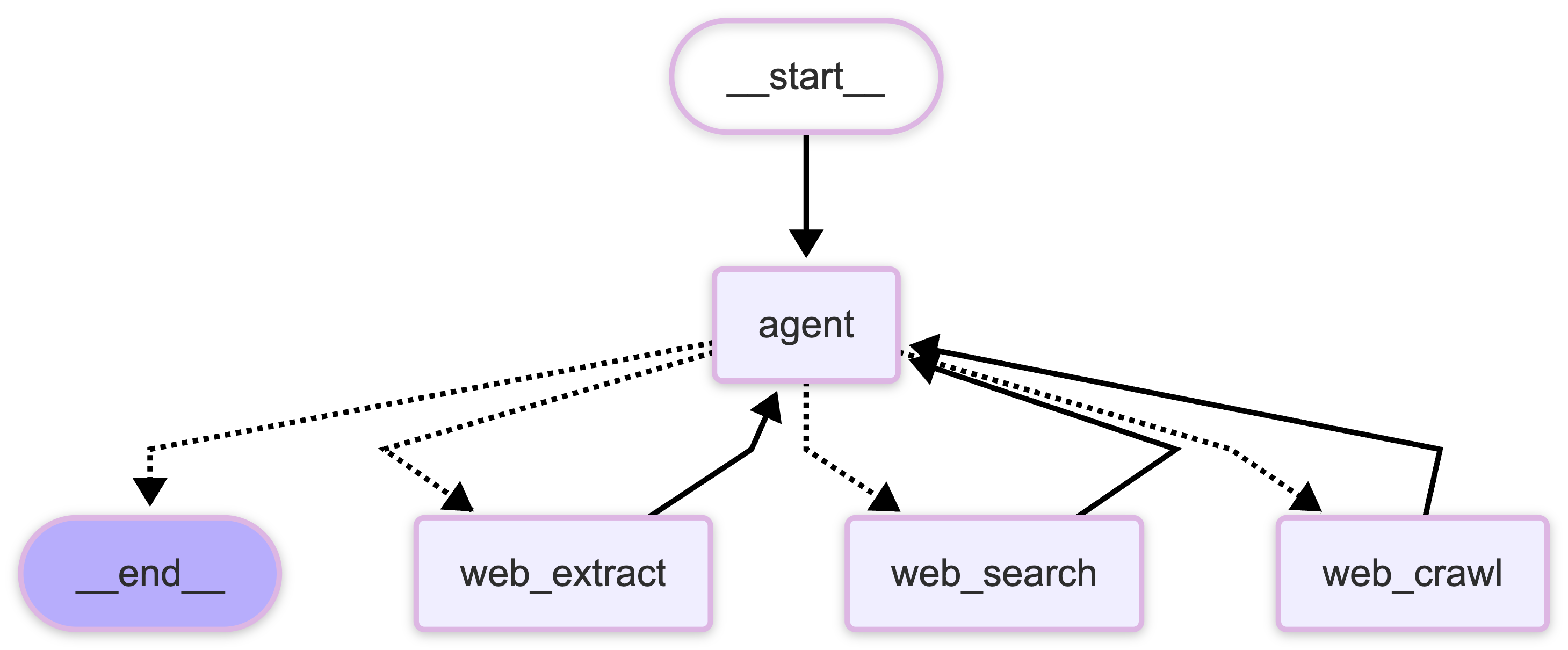 The workflow consists of several key components:
The chatbot uses LangGraph MemorySaver to manage conversation flow. The graph structure controls how messages are processed and routed.
This code snippet is not meant to run standalone. View the full implementation in our [GitHub repository](https://github.com/tavily-ai/tavily-chat).
```python theme={null}
class WebAgent:
def __init__(
self,
):
self.llm = ChatOpenAI(
model="gpt-4.1-nano", api_key=os.getenv("OPENAI_API_KEY")
).with_config({"tags": ["streaming"]})
# Define the LangChain search tool
self.search = TavilySearch(
max_results=10, topic="general", api_key=os.getenv("TAVILY_API_KEY")
)
# Define the LangChain extract tool
self.extract = TavilyExtract(
extract_depth="advanced", api_key=os.getenv("TAVILY_API_KEY")
)
# Define the LangChain crawl tool
self.crawl = TavilyCrawl(api_key=os.getenv("TAVILY_API_KEY"))
self.prompt = PROMPT
self.checkpointer = MemorySaver()
def build_graph(self):
"""
Build and compile the LangGraph workflow.
"""
return create_react_agent(
prompt=self.prompt,
model=self.llm,
tools=[self.search, self.extract, self.crawl],
checkpointer=self.checkpointer,
)
```
The router decides whether to use base knowledge or perform a Tavily web search, extract, or crawl based on:
* Question complexity
* Need for current information
* Available conversation context
The chatbot maintains conversation history using a memory system that:
* Preserves context across multiple exchanges
* Stores relevant search results for future reference
* Manages system prompts and initialization
When Tavily access is needed, the chatbot:
* Performs targeted web search, extract, or crawl using the LangChain integration
* Includes source citations
Users receive real-time updates on:
* Search progress
* Response generation
* Source processing
The workflow consists of several key components:
The chatbot uses LangGraph MemorySaver to manage conversation flow. The graph structure controls how messages are processed and routed.
This code snippet is not meant to run standalone. View the full implementation in our [GitHub repository](https://github.com/tavily-ai/tavily-chat).
```python theme={null}
class WebAgent:
def __init__(
self,
):
self.llm = ChatOpenAI(
model="gpt-4.1-nano", api_key=os.getenv("OPENAI_API_KEY")
).with_config({"tags": ["streaming"]})
# Define the LangChain search tool
self.search = TavilySearch(
max_results=10, topic="general", api_key=os.getenv("TAVILY_API_KEY")
)
# Define the LangChain extract tool
self.extract = TavilyExtract(
extract_depth="advanced", api_key=os.getenv("TAVILY_API_KEY")
)
# Define the LangChain crawl tool
self.crawl = TavilyCrawl(api_key=os.getenv("TAVILY_API_KEY"))
self.prompt = PROMPT
self.checkpointer = MemorySaver()
def build_graph(self):
"""
Build and compile the LangGraph workflow.
"""
return create_react_agent(
prompt=self.prompt,
model=self.llm,
tools=[self.search, self.extract, self.crawl],
checkpointer=self.checkpointer,
)
```
The router decides whether to use base knowledge or perform a Tavily web search, extract, or crawl based on:
* Question complexity
* Need for current information
* Available conversation context
The chatbot maintains conversation history using a memory system that:
* Preserves context across multiple exchanges
* Stores relevant search results for future reference
* Manages system prompts and initialization
When Tavily access is needed, the chatbot:
* Performs targeted web search, extract, or crawl using the LangChain integration
* Includes source citations
Users receive real-time updates on:
* Search progress
* Response generation
* Source processing