> ## Documentation Index
> Fetch the complete documentation index at: https://docs.tavily.com/llms.txt
> Use this file to discover all available pages before exploring further.
# TrueFoundry
> Connect Tavily as a managed MCP server through the TrueFoundry MCP Gateway.
## Overview
[TrueFoundry AI Gateway](https://www.truefoundry.com/ai-gateway) is the proxy layer that sits between your applications and the LLM providers and MCP Servers. It is an enterprise-grade platform that enables users to access 1000+ LLMs using a unified interface while taking care of observability and governance.
TrueFoundry provides Tavily as a fully managed MCP server in the TrueFoundry MCP Gateway. Use this integration when you want Tavily's web search, extraction, crawling, mapping, and research tools behind a managed gateway with centralized auth, tool controls, guardrails, audit trails, and metrics.
TrueFoundry's MCP Gateway acts as a reverse proxy between your MCP clients or agents and Tavily. Agents authenticate to the TrueFoundry gateway, while Tavily account authorization happens through OAuth2.
## Prerequisites
* A TrueFoundry account with access to the MCP Gateway.
* A Tavily account for OAuth2 authorization.
* An MCP-compatible client or coding environment if you want to connect from Cursor, Claude Code, VS Code, Claude Desktop, Windsurf, Codex, or an MCP SDK.
## Set up Tavily in TrueFoundry
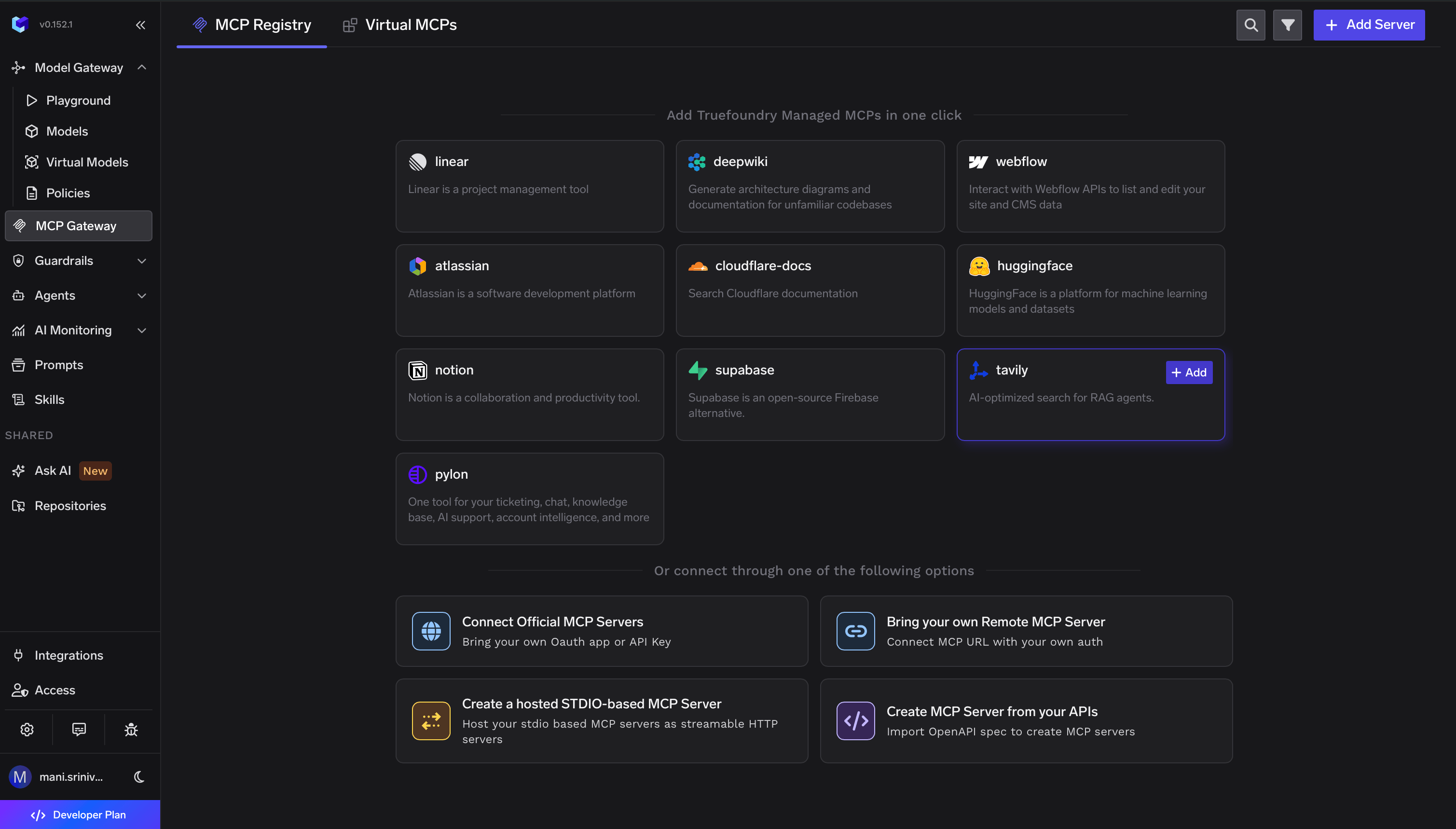
Sign in to TrueFoundry, open **MCP Gateway** from the sidebar, and click **Add Server** or **Add new MCP Server**. Choose the managed MCP catalog option to view TrueFoundry-managed MCP servers.
Find **tavily** in the managed MCP catalog and click **+ Add**. TrueFoundry describes the Tavily server as AI-optimized search for RAG agents.
 After Tavily is added, open the Tavily MCP server detail page. From here, you can connect an MCP client from the **How To Use** tab, authorize Tavily from the **Tools** tab, or do both.
## Option 1: Add Tavily to an MCP client
Open the **How To Use** tab on the Tavily MCP server detail page. Select your IDE, coding environment, or MCP client, then copy the generated instructions from the right panel.
TrueFoundry generates client-specific setup for major MCP clients, including Claude Code, VS Code, Claude Web, Claude Desktop, Cursor, Windsurf, Codex, and the Python and TypeScript MCP SDKs. Copy the exact URL and command shown in TrueFoundry instead of constructing the endpoint manually, because the gateway URL is tenant-specific.
If your selected client requires a gateway API key, use **Show API Key** on the **How To Use** tab and add it exactly as shown in the generated snippet.
## Option 2: Authorize Tavily with OAuth2
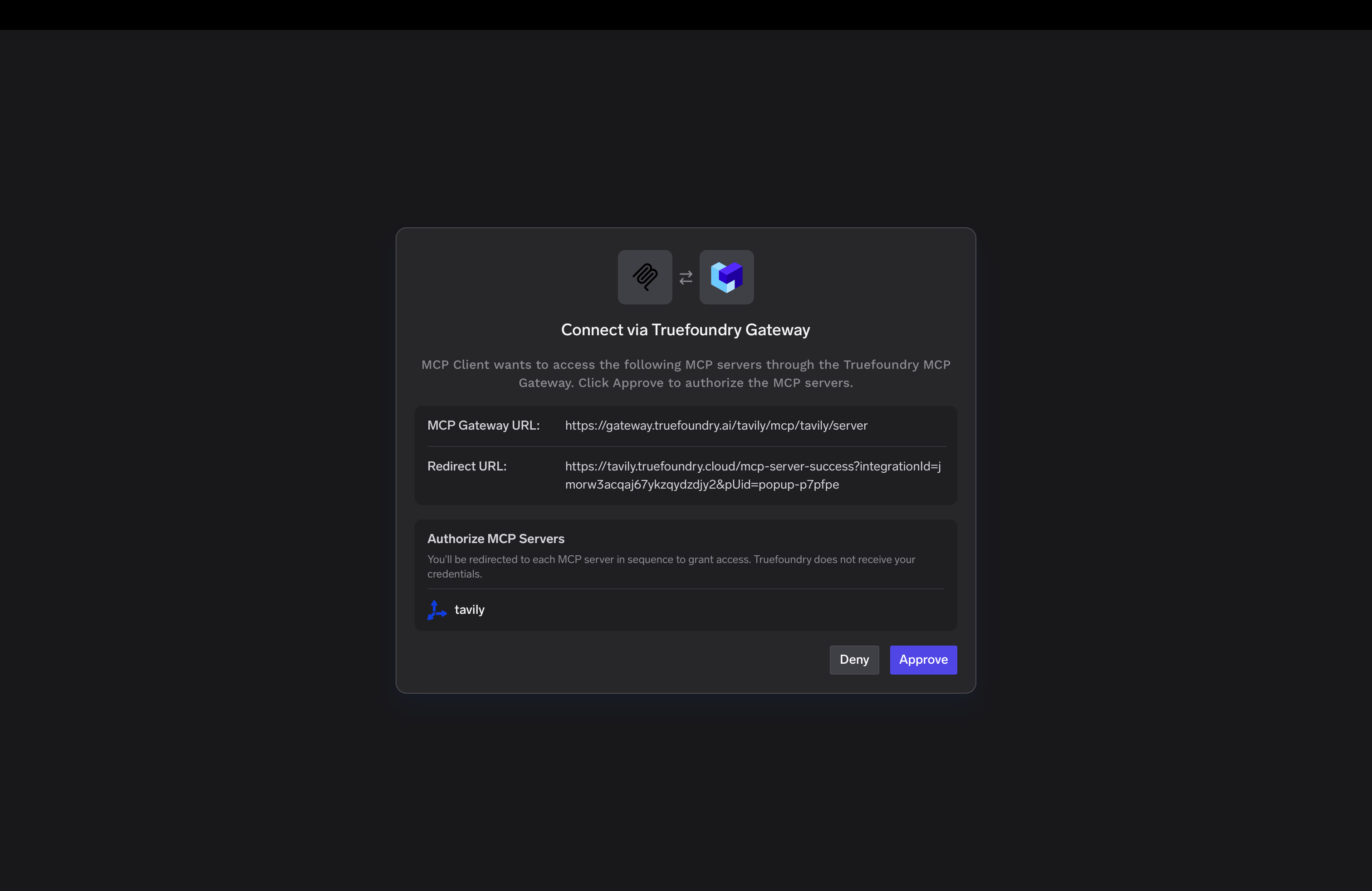
Open the **Tools** tab on the Tavily MCP server detail page and click **Connect Now**. TrueFoundry shows a **Connect via TrueFoundry Gateway** approval screen with the MCP Gateway URL and redirect URL.
Review the gateway details, click **Approve**, and complete the Tavily login and authorization flow. TrueFoundry states that it does not receive your Tavily credentials during this flow.
After Tavily is added, open the Tavily MCP server detail page. From here, you can connect an MCP client from the **How To Use** tab, authorize Tavily from the **Tools** tab, or do both.
## Option 1: Add Tavily to an MCP client
Open the **How To Use** tab on the Tavily MCP server detail page. Select your IDE, coding environment, or MCP client, then copy the generated instructions from the right panel.
TrueFoundry generates client-specific setup for major MCP clients, including Claude Code, VS Code, Claude Web, Claude Desktop, Cursor, Windsurf, Codex, and the Python and TypeScript MCP SDKs. Copy the exact URL and command shown in TrueFoundry instead of constructing the endpoint manually, because the gateway URL is tenant-specific.
If your selected client requires a gateway API key, use **Show API Key** on the **How To Use** tab and add it exactly as shown in the generated snippet.
## Option 2: Authorize Tavily with OAuth2
Open the **Tools** tab on the Tavily MCP server detail page and click **Connect Now**. TrueFoundry shows a **Connect via TrueFoundry Gateway** approval screen with the MCP Gateway URL and redirect URL.
Review the gateway details, click **Approve**, and complete the Tavily login and authorization flow. TrueFoundry states that it does not receive your Tavily credentials during this flow.
 ## Configure and try tools
After OAuth2 authorization succeeds, the **Tools** tab populates with Tavily tools. Each tool includes its description, an enable or disable toggle, and a **Try** button for testing directly in TrueFoundry before connecting production agents.
## Configure and try tools
After OAuth2 authorization succeeds, the **Tools** tab populates with Tavily tools. Each tool includes its description, an enable or disable toggle, and a **Try** button for testing directly in TrueFoundry before connecting production agents.
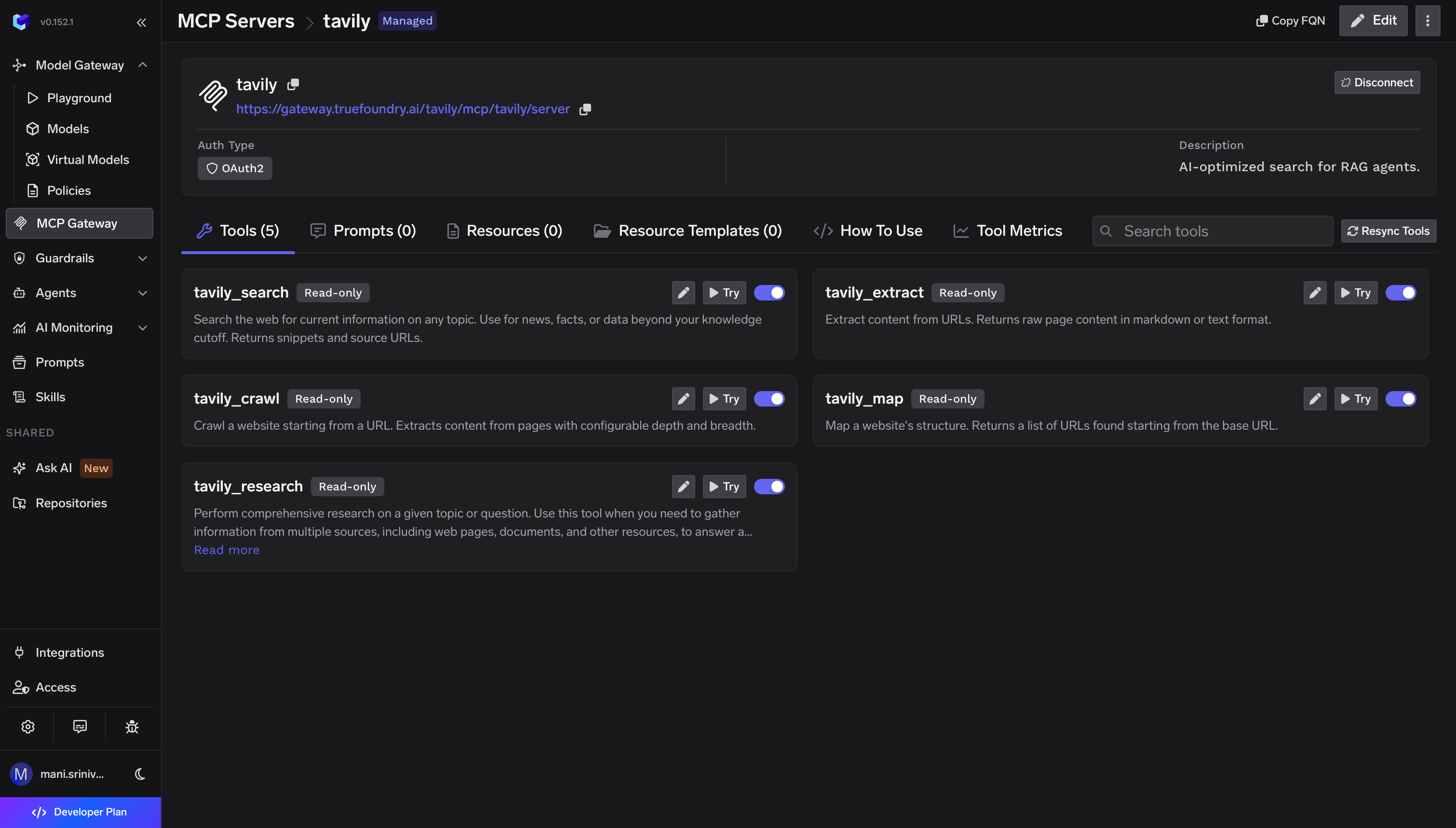 The Tavily tools shown in TrueFoundry include:
| Tool | What it does |
| ----------------- | --------------------------------------------------------------------------------------- |
| `tavily_search` | Searches the web for current information and returns snippets and source URLs. |
| `tavily_extract` | Extracts content from URLs and returns page content in markdown or text format. |
| `tavily_crawl` | Crawls a website from a starting URL with configurable depth and breadth. |
| `tavily_map` | Maps a website's structure and returns URLs found from the base URL. |
| `tavily_research` | Performs multi-source research and returns synthesized results for a topic or question. |
To test a tool, click **Try**, fill in the required inputs, execute the tool, and inspect the JSON response in the output panel. For `tavily_search`, TrueFoundry exposes inputs such as query, max results, search depth, topic, time range, and include or exclude domains.
## Govern and monitor usage
Use the **Tools** tab to enable or disable individual Tavily tools. Disabled tools are not returned to MCP clients, which helps reduce the callable tool surface for agents.
Use the **Tool Metrics** tab to monitor tool invocations, latency, and errors. TrueFoundry also supports MCP guardrail hooks before and after tool calls, so teams can apply policies to Tavily search queries and results.
## Resources
* [TrueFoundry: Set up Tavily MCP Server](https://www.truefoundry.com/docs/ai-gateway/mcp/tavily-mcp-server)
* [Tavily MCP Documentation](/documentation/mcp)
The Tavily tools shown in TrueFoundry include:
| Tool | What it does |
| ----------------- | --------------------------------------------------------------------------------------- |
| `tavily_search` | Searches the web for current information and returns snippets and source URLs. |
| `tavily_extract` | Extracts content from URLs and returns page content in markdown or text format. |
| `tavily_crawl` | Crawls a website from a starting URL with configurable depth and breadth. |
| `tavily_map` | Maps a website's structure and returns URLs found from the base URL. |
| `tavily_research` | Performs multi-source research and returns synthesized results for a topic or question. |
To test a tool, click **Try**, fill in the required inputs, execute the tool, and inspect the JSON response in the output panel. For `tavily_search`, TrueFoundry exposes inputs such as query, max results, search depth, topic, time range, and include or exclude domains.
## Govern and monitor usage
Use the **Tools** tab to enable or disable individual Tavily tools. Disabled tools are not returned to MCP clients, which helps reduce the callable tool surface for agents.
Use the **Tool Metrics** tab to monitor tool invocations, latency, and errors. TrueFoundry also supports MCP guardrail hooks before and after tool calls, so teams can apply policies to Tavily search queries and results.
## Resources
* [TrueFoundry: Set up Tavily MCP Server](https://www.truefoundry.com/docs/ai-gateway/mcp/tavily-mcp-server)
* [Tavily MCP Documentation](/documentation/mcp)