> ## Documentation Index
> Fetch the complete documentation index at: https://docs.tavily.com/llms.txt
> Use this file to discover all available pages before exploring further.
# n8n
> Tavily is now available for no-code integration through n8n.
## Introduction
Integrate Tavily with n8n to enhance your workflows with real-time web search and content extraction—without writing code. With Tavily's powerful search and extraction capabilities, you can seamlessly integrate up-to-date online information into your n8n automations.
 ## How to set up Tavily with n8n
[Log in](https://n8n.io/) to your n8n account or self-hosted instance.
Create a new workflow and select a trigger node to start your automation.
**Option 1: Add Tavily as a Node**
In the node library, search for **Tavily**. Add it to your workflow and choose between **Search** or **Extract** actions.
**Option 2: Add Tavily as a Tool to an AI Agent**
If you are building an AI agent workflow, you can add Tavily as a tool to your agent. This allows your agent to use Tavily for web search or content extraction as part of its reasoning process.
**Connection:** Connect your Tavily account by entering your [Tavily API key](https://app.tavily.com/home).
**Configuration:** Set up your parameters:
**For Search:**
* Enter your search `query` (can be manually entered or populated from another node's output)
* Select a `topic` (`general` or `news`)
* Choose whether to include raw content or generate an answer
* Specify domains to include or exclude
* Set search depth and other optional parameters
**For Extract:**
* Enter the URL(s) to extract content from (can be a single URL or multiple URLs from another node's output)
* Choose extraction type (`basic` or `advanced`)
**Test:** Run a test to verify your configuration.
Utilize the search or extraction results in your workflow:
* Process data through additional nodes
* Send information to your CRM, database, or email
* Generate reports or notifications
* Feed data into AI models for further processing
## Use cases for Tavily in n8n
Leverage Tavily's capabilities to create powerful automated workflows:
* **Job Search Automation**: Find and summarize new job postings, then send results to your inbox
* **Competitive Intelligence**: Automatically gather and analyze competitor information
* **Market Research**: Track industry trends and market developments
* **Content Curation**: Collect and organize relevant content for your business
* **Lead Enrichment**: Enhance lead data with real-time information
* **News Monitoring**: Stay updated with the latest developments in your field
## Detailed example – Automated job search
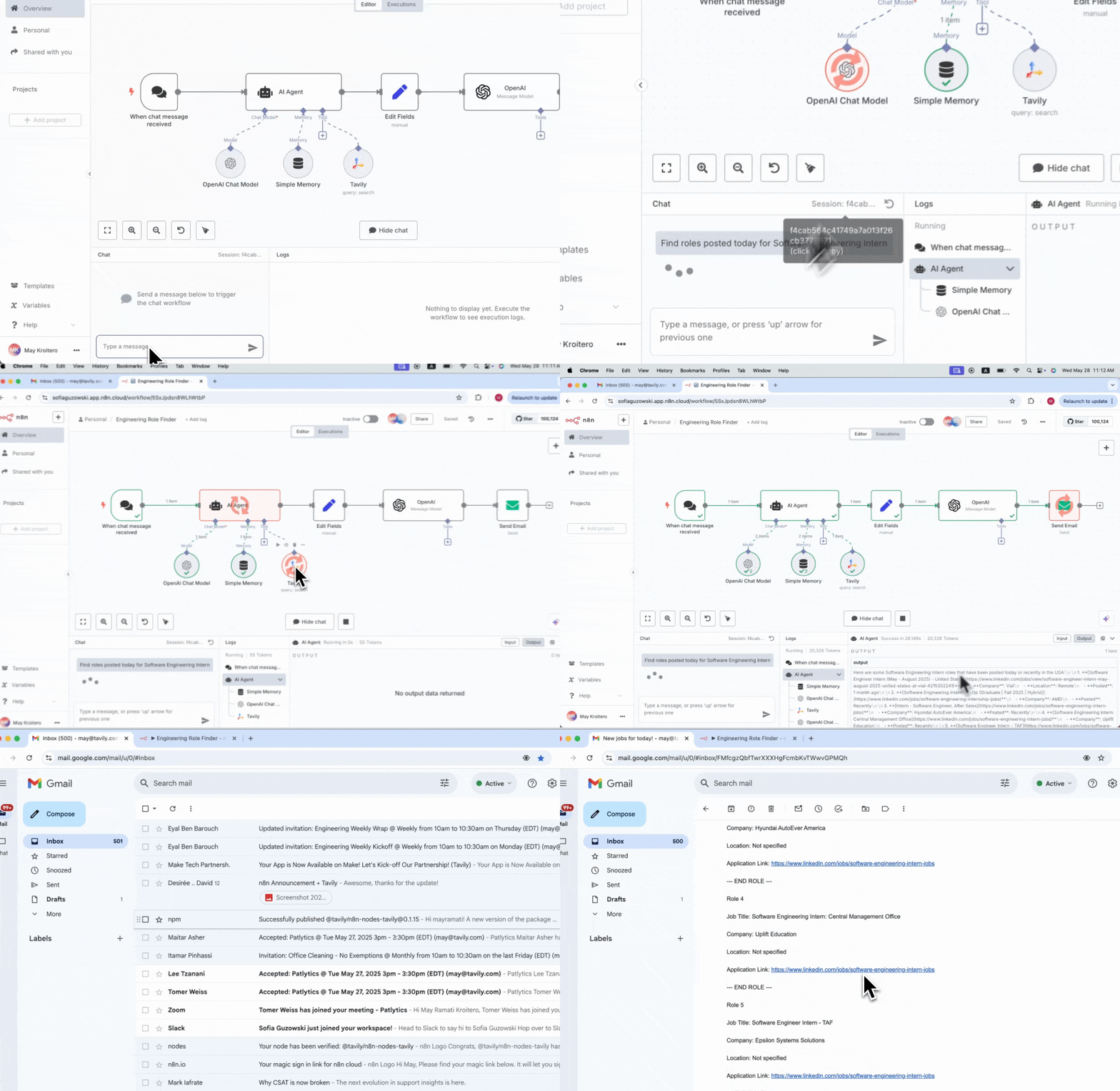
Create an automated workflow that uses an AI agent with Tavily as a tool for web search to find new "Software Engineering Intern Roles" on the web, summarizes the results, and sends them to your email.
1. **Trigger:** Schedule the workflow to run daily or weekly
2. **AI Agent:** Add an AI agent node to your workflow
3. **Add Tavily as a Tool:** In the AI agent configuration, add Tavily as a tool for web search
4. **Search:** The AI agent uses Tavily to find new "Software Engineering Intern Roles"
5. **Summarize:** The AI agent summarizes the search results using its LLM capabilities
6. **Email:** Use the Email node to send the summarized results to your inbox
## Best practices
To optimize your Tavily integration in n8n:
* Use the SplitInBatches node to process multiple search results efficiently
* Use filters to process only relevant results
* Use the Merge node to combine multiple search results
## How to set up Tavily with n8n
[Log in](https://n8n.io/) to your n8n account or self-hosted instance.
Create a new workflow and select a trigger node to start your automation.
**Option 1: Add Tavily as a Node**
In the node library, search for **Tavily**. Add it to your workflow and choose between **Search** or **Extract** actions.
**Option 2: Add Tavily as a Tool to an AI Agent**
If you are building an AI agent workflow, you can add Tavily as a tool to your agent. This allows your agent to use Tavily for web search or content extraction as part of its reasoning process.
**Connection:** Connect your Tavily account by entering your [Tavily API key](https://app.tavily.com/home).
**Configuration:** Set up your parameters:
**For Search:**
* Enter your search `query` (can be manually entered or populated from another node's output)
* Select a `topic` (`general` or `news`)
* Choose whether to include raw content or generate an answer
* Specify domains to include or exclude
* Set search depth and other optional parameters
**For Extract:**
* Enter the URL(s) to extract content from (can be a single URL or multiple URLs from another node's output)
* Choose extraction type (`basic` or `advanced`)
**Test:** Run a test to verify your configuration.
Utilize the search or extraction results in your workflow:
* Process data through additional nodes
* Send information to your CRM, database, or email
* Generate reports or notifications
* Feed data into AI models for further processing
## Use cases for Tavily in n8n
Leverage Tavily's capabilities to create powerful automated workflows:
* **Job Search Automation**: Find and summarize new job postings, then send results to your inbox
* **Competitive Intelligence**: Automatically gather and analyze competitor information
* **Market Research**: Track industry trends and market developments
* **Content Curation**: Collect and organize relevant content for your business
* **Lead Enrichment**: Enhance lead data with real-time information
* **News Monitoring**: Stay updated with the latest developments in your field
## Detailed example – Automated job search
Create an automated workflow that uses an AI agent with Tavily as a tool for web search to find new "Software Engineering Intern Roles" on the web, summarizes the results, and sends them to your email.
1. **Trigger:** Schedule the workflow to run daily or weekly
2. **AI Agent:** Add an AI agent node to your workflow
3. **Add Tavily as a Tool:** In the AI agent configuration, add Tavily as a tool for web search
4. **Search:** The AI agent uses Tavily to find new "Software Engineering Intern Roles"
5. **Summarize:** The AI agent summarizes the search results using its LLM capabilities
6. **Email:** Use the Email node to send the summarized results to your inbox
## Best practices
To optimize your Tavily integration in n8n:
* Use the SplitInBatches node to process multiple search results efficiently
* Use filters to process only relevant results
* Use the Merge node to combine multiple search results