> ## Documentation Index
> Fetch the complete documentation index at: https://docs.tavily.com/llms.txt
> Use this file to discover all available pages before exploring further.
# Claude
> Use Tavily across the Claude ecosystem as a Connector or as a Plugin to enable real-time web search, extraction, crawling, and research.
## Introduction
[Claude](https://claude.ai/) is Anthropic's AI assistant designed for reasoning, coding, and research workflows across multiple environments like Claude Desktop, claude.ai, Claude Code, and Claude Cowork.
Tavily integrates with the Claude ecosystem in **two main ways**:
* **As a Connector** — a one-click, OAuth-based integration available in Claude Desktop, claude.ai, and Claude Cowork. Built on top of [MCP](https://modelcontextprotocol.io/docs/getting-started/intro) (Model Context Protocol).
* **As a Plugin** — a packaged installation for Claude Code that bundles Tavily's tools and slash commands directly into your terminal workflow.
### Connector vs. Plugin
| | **Connector** | **Plugin** |
| ------------------ | --------------------------------------------- | ---------------------------------------------------------------------------------------------------------------------------------------------- |
| **Where it runs** | Claude Desktop, claude.ai, Claude Cowork | Claude Code (terminal), Claude Cowork (desktop) |
| **Install method** | One-click + OAuth in Claude Settings | `/plugin marketplace add https://github.com/tavily-ai/skills` → `/plugins` → Marketplace → `tavily-plugins` (CLI) or **Add Plugins** in Cowork |
| **Auth** | OAuth flow | `TAVILY_API_KEY` in `~/.claude/settings.json` |
| **Best for** | Chat-based research, everyday Claude usage | Developer workflows, scripted research, slash-command power users |
| **Invocation** | Automatic — Claude picks the tool when needed | Automatic or via slash commands (e.g., `/tavily:search`) |
Pick whichever matches where you use Claude — or use both.
***
# Connector
## Tavily + Claude
Tavily integrates with Claude as an official connector, giving Claude access to:
* Real-time web search
* Content extraction from URLs
* Website crawling and mapping
* Deep research workflows
Once connected, Claude can automatically use Tavily whenever external information is required.
***
## Supported Claude surfaces
Tavily works across the Claude ecosystem:
* [Claude Cowork](https://www.anthropic.com/product/claude-cowork)
* Claude Code - Through Claude Desktop, Alternatively if you want to use Tavily through Claude Code terminal, follow [this](https://docs.tavily.com/documentation/mcp#connect-to-claude-code).
* [claude.ai](https://claude.ai/)
* [Claude Desktop](https://support.claude.com/en/articles/10065433-installing-claude-desktop)
***
## Installation
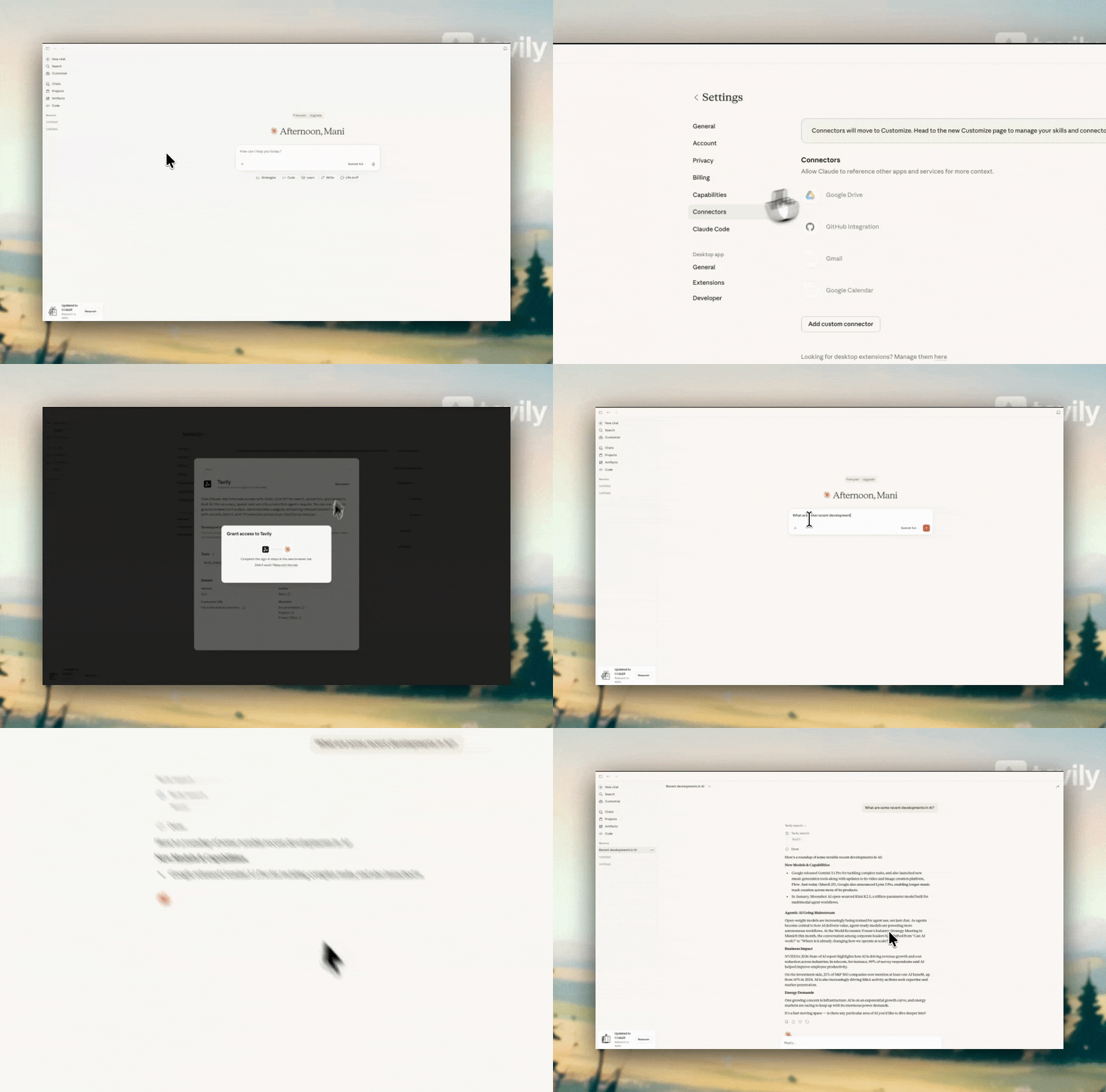 Go to **Settings** inside Claude.
Click on the **Connectors** tab.
Search for **Tavily** and click the **+ (Connect)** button.
Complete the OAuth flow to connect Tavily.
After connecting, go to **Configure** and enable **Allow always** (recommended).
This allows Claude to automatically use Tavily whenever web search or external data is needed.
***
## Tavily tools available
| Tool | Description |
| ---------------- | ------------------------------------- |
| tavily\_search | Real-time web search |
| tavily\_extract | Extract clean content from URLs |
| tavily\_crawl | Crawl multiple pages from a site |
| tavily\_map | Discover site structure and URLs |
| tavily\_research | Multi-step deep research workflows |
| tavily\_skill | Search the best skills for your agent |
***
## How Tavily works inside Claude
Once connected, Tavily runs automatically inside Claude:
* Claude detects when external data or web search is needed
* Tavily tools are invoked automatically
* Results are returned and used in Claude's response
If **Allow always** is enabled, everything works seamlessly without the need of manually accepting it.
***
## Example use cases
### tavily\_search
**Query:**
"What are the latest updates in AI this week?"
**What happens:**
Claude identifies this as a real-time information request and calls `tavily_search`.
* Tavily fetches recent news, blogs, and updates
* Claude selects the most relevant sources
* Results are synthesized into a concise summary
**Outcome:**
A current, source-backed overview of the latest AI developments.
***
### tavily\_extract
**Query:**
"Summarize this article: [https://example.com/ai-report](https://example.com/ai-report)"
**What happens:**
Claude detects a URL and calls `tavily_extract`.
* Tavily extracts clean content from the page
* Removes boilerplate (ads, navigation, etc.)
* Returns structured text
Claude then summarizes or analyzes the extracted content.
**Outcome:**
A clean, accurate summary of the article without noise.
***
### tavily\_crawl
**Query:**
"Go through Stripe's documentation and explain how subscriptions work"
**What happens:**
Claude needs multiple pages to answer this.
* Calls `tavily_crawl` on the documentation root
* Tavily traverses linked pages
* Relevant pages are collected and processed
Claude aggregates information across pages and generates a unified explanation.
**Outcome:**
A complete answer built from multiple documentation pages.
***
### tavily\_research
**Query:**
"Do a deep analysis of the AI chip market and key players"
**What happens:**
Claude recognizes this as a complex, multi-step research task.
* Calls `tavily_research` (deep research agent)
* Tavily performs multi-source search, extraction, and synthesis
* Iteratively refines findings across sources
Claude then compiles a structured, high-quality research report.
**Outcome:**
A comprehensive, multi-source analysis rather than a simple summary.
***
# Plugin
The Tavily Plugin brings Tavily's tools directly into Claude's developer surfaces — **Claude Code** (terminal) and **Cowork** (desktop). Install it once and use Tavily via slash commands or let Claude invoke the right skill automatically.
## Install
### Prereq: Tavily API key
Add to `~/.claude/settings.json`:
```json theme={null}
{
"env": {
"TAVILY_API_KEY": "tvly-your-key-here"
}
}
```
Get a key at [tavily.com](https://tavily.com).
### Option A — Claude Code (CLI)
The steps to follow:
1. ```
/plugin marketplace add https://github.com/tavily-ai/skills
```
2. ```
/plugins
```
3. Go to **Marketplace**
4. Scroll down to **tavily-plugins**
5. Click **Browse plugin**
6. Click **Install (according to scope required)**
Then `/clear` and `Ctrl+C` to restart.
### Option B — Cowork (desktop)
1. Click the **+** icon
2. **Add Plugins** → **Anthropic and Partners**
3. Search **Tavily** → **Add**
4. (Optional) Customize via settings
### Use (both surfaces)
```
/tavily:search latest news on EU AI Act
/tavily:research electric vehicle market 2026
/tavily:crawl https://docs.tavily.com
/tavily:extract https://example.com/article
```
Or just ask Claude naturally — it'll pick the right skill automatically.
***
## Learn more
* Claude Connectors Directory - [https://claude.com/connectors](https://claude.com/connectors)
* Use Tavily with Anthropic SDK - [https://docs.tavily.com/documentation/integrations/anthropic](https://docs.tavily.com/documentation/integrations/anthropic)
Go to **Settings** inside Claude.
Click on the **Connectors** tab.
Search for **Tavily** and click the **+ (Connect)** button.
Complete the OAuth flow to connect Tavily.
After connecting, go to **Configure** and enable **Allow always** (recommended).
This allows Claude to automatically use Tavily whenever web search or external data is needed.
***
## Tavily tools available
| Tool | Description |
| ---------------- | ------------------------------------- |
| tavily\_search | Real-time web search |
| tavily\_extract | Extract clean content from URLs |
| tavily\_crawl | Crawl multiple pages from a site |
| tavily\_map | Discover site structure and URLs |
| tavily\_research | Multi-step deep research workflows |
| tavily\_skill | Search the best skills for your agent |
***
## How Tavily works inside Claude
Once connected, Tavily runs automatically inside Claude:
* Claude detects when external data or web search is needed
* Tavily tools are invoked automatically
* Results are returned and used in Claude's response
If **Allow always** is enabled, everything works seamlessly without the need of manually accepting it.
***
## Example use cases
### tavily\_search
**Query:**
"What are the latest updates in AI this week?"
**What happens:**
Claude identifies this as a real-time information request and calls `tavily_search`.
* Tavily fetches recent news, blogs, and updates
* Claude selects the most relevant sources
* Results are synthesized into a concise summary
**Outcome:**
A current, source-backed overview of the latest AI developments.
***
### tavily\_extract
**Query:**
"Summarize this article: [https://example.com/ai-report](https://example.com/ai-report)"
**What happens:**
Claude detects a URL and calls `tavily_extract`.
* Tavily extracts clean content from the page
* Removes boilerplate (ads, navigation, etc.)
* Returns structured text
Claude then summarizes or analyzes the extracted content.
**Outcome:**
A clean, accurate summary of the article without noise.
***
### tavily\_crawl
**Query:**
"Go through Stripe's documentation and explain how subscriptions work"
**What happens:**
Claude needs multiple pages to answer this.
* Calls `tavily_crawl` on the documentation root
* Tavily traverses linked pages
* Relevant pages are collected and processed
Claude aggregates information across pages and generates a unified explanation.
**Outcome:**
A complete answer built from multiple documentation pages.
***
### tavily\_research
**Query:**
"Do a deep analysis of the AI chip market and key players"
**What happens:**
Claude recognizes this as a complex, multi-step research task.
* Calls `tavily_research` (deep research agent)
* Tavily performs multi-source search, extraction, and synthesis
* Iteratively refines findings across sources
Claude then compiles a structured, high-quality research report.
**Outcome:**
A comprehensive, multi-source analysis rather than a simple summary.
***
# Plugin
The Tavily Plugin brings Tavily's tools directly into Claude's developer surfaces — **Claude Code** (terminal) and **Cowork** (desktop). Install it once and use Tavily via slash commands or let Claude invoke the right skill automatically.
## Install
### Prereq: Tavily API key
Add to `~/.claude/settings.json`:
```json theme={null}
{
"env": {
"TAVILY_API_KEY": "tvly-your-key-here"
}
}
```
Get a key at [tavily.com](https://tavily.com).
### Option A — Claude Code (CLI)
The steps to follow:
1. ```
/plugin marketplace add https://github.com/tavily-ai/skills
```
2. ```
/plugins
```
3. Go to **Marketplace**
4. Scroll down to **tavily-plugins**
5. Click **Browse plugin**
6. Click **Install (according to scope required)**
Then `/clear` and `Ctrl+C` to restart.
### Option B — Cowork (desktop)
1. Click the **+** icon
2. **Add Plugins** → **Anthropic and Partners**
3. Search **Tavily** → **Add**
4. (Optional) Customize via settings
### Use (both surfaces)
```
/tavily:search latest news on EU AI Act
/tavily:research electric vehicle market 2026
/tavily:crawl https://docs.tavily.com
/tavily:extract https://example.com/article
```
Or just ask Claude naturally — it'll pick the right skill automatically.
***
## Learn more
* Claude Connectors Directory - [https://claude.com/connectors](https://claude.com/connectors)
* Use Tavily with Anthropic SDK - [https://docs.tavily.com/documentation/integrations/anthropic](https://docs.tavily.com/documentation/integrations/anthropic)