> ## Documentation Index
> Fetch the complete documentation index at: https://docs.tavily.com/llms.txt
> Use this file to discover all available pages before exploring further.
# Best Practices for Search
> Optimize individual queries, and run search reliably at scale with batch workflows.
## Query Optimization
### Keep your query under 400 characters
Keep queries concise—under **400 characters**. Think of it as a query for an agent performing web search, not long-form prompts.
### Break complex queries into sub-queries
For complex or multi-topic queries, send separate focused requests:
```json theme={null}
// Instead of one massive query, break it down:
{ "query": "Competitors of company ABC." }
{ "query": "Financial performance of company ABC." }
{ "query": "Recent developments of company ABC." }
```
## Search Depth
The `search_depth` parameter controls the tradeoff between latency and relevance:
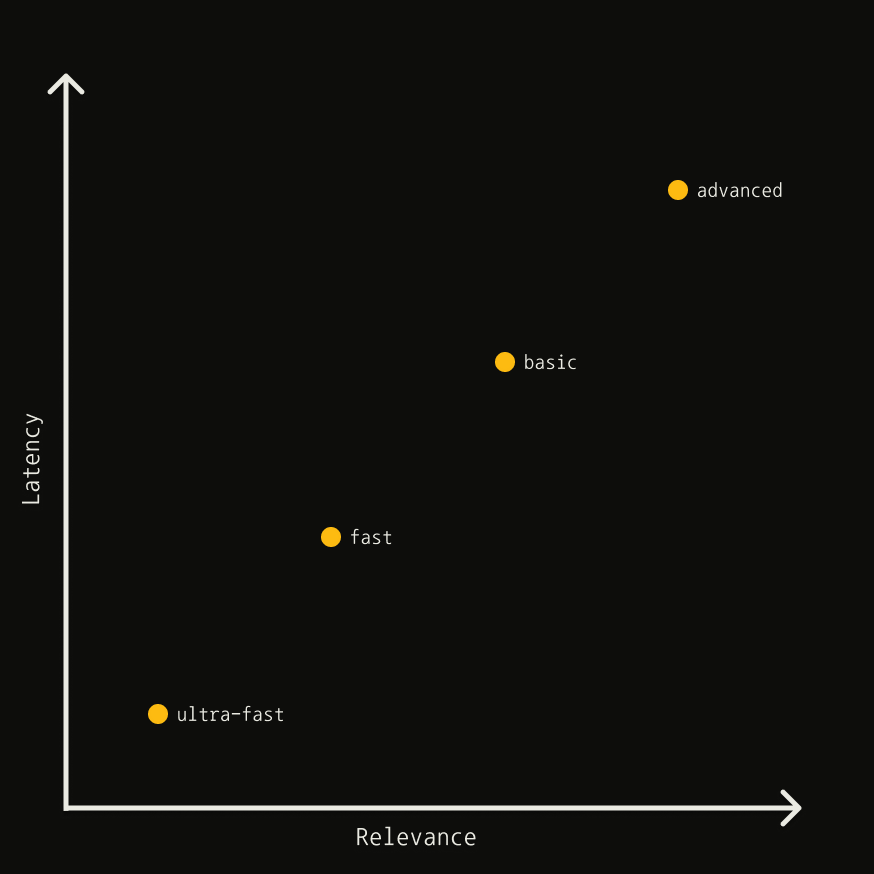 *This chart is a heuristic and is not to scale.*
| Depth | Latency | Relevance | Content Type |
| ------------ | ------- | --------- | ------------ |
| `ultra-fast` | Lowest | Lower | Content |
| `fast` | Low | Good | Chunks |
| `basic` | Medium | High | Content |
| `advanced` | Higher | Highest | Chunks |
### Content types
| Type | Description |
| ----------- | --------------------------------------------------------- |
| **Content** | NLP-based summary of the page, providing general context |
| **Chunks** | Short snippets reranked by relevance to your search query |
Use **chunks** when you need highly targeted information aligned with your query. Use **content** when a general page summary is sufficient.
### Fast + Ultra-Fast
| Depth | When to use |
| ------------ | ----------------------------------------------------------------------------------------------------------------------------------------------------------------------- |
| `ultra-fast` | When latency is absolutely crucial. Delivers near-instant results, prioritizing speed over relevance. Ideal for real-time applications where response time is critical. |
| `fast` | When latency is more important than relevance, but you want results in reranked chunks format. Good for applications that need quick, targeted snippets. |
| `basic` | A solid balance between relevance and latency. Best for general-purpose searches where you need quality results without the overhead of advanced processing. |
| `advanced` | When you need the highest relevance and are willing to trade off latency. Best for queries seeking specific, detailed information. |
### Using `search_depth=advanced`
Best for queries seeking specific information:
```json theme={null}
{
"query": "How many countries use Monday.com?",
"search_depth": "advanced",
"chunks_per_source": 3,
"include_raw_content": true
}
```
## Filtering Results
### By date
| Parameter | Description |
| ------------------------- | ------------------------------------------------------- |
| `time_range` | Filter by relative time: `day`, `week`, `month`, `year` |
| `start_date` / `end_date` | Filter by specific date range (format: `YYYY-MM-DD`) |
```json theme={null}
{ "query": "latest ML trends", "time_range": "month" }
{ "query": "AI news", "start_date": "2025-01-01", "end_date": "2025-02-01" }
```
### By topic
Use `topic` to filter by content type. Set to `news` for news sources (includes `published_date` metadata):
```json theme={null}
{ "query": "What happened today in NY?", "topic": "news" }
```
### By domain
| Parameter | Description |
| ----------------- | ------------------------------------- |
| `include_domains` | Limit to specific domains |
| `exclude_domains` | Filter out specific domains |
| `country` | Boost results from a specific country |
```json theme={null}
// Restrict to LinkedIn profiles
{ "query": "CEO background at Google", "include_domains": ["linkedin.com/in"] }
// Exclude irrelevant domains
{ "query": "US economy trends", "exclude_domains": ["espn.com", "vogue.com"] }
// Boost results from a country
{ "query": "tech startup funding", "country": "united states" }
// Wildcard: limit to .com, exclude specific site
{ "query": "AI news", "include_domains": ["*.com"], "exclude_domains": ["example.com"] }
```
Keep domain lists short and relevant for best results.
## Response Content
### `max_results`
Limits results returned (default: `5`). Setting too high may return lower-quality results.
### `include_raw_content`
Returns full extracted page content. For comprehensive extraction, consider a two-step process:
1. Search to retrieve relevant URLs
2. Use [Extract API](/documentation/best-practices/best-practices-extract#2-two-step-process-search-then-extract) to get content
### `auto_parameters`
Tavily automatically configures parameters based on query intent. Your explicit values override automatic ones.
```json theme={null}
{
"query": "impact of AI in education policy",
"auto_parameters": true,
"search_depth": "basic" // Override to control cost
}
```
`auto_parameters` may set `search_depth` to `advanced` (2 credits). Set it
manually to control cost.
## Exact Match
Use `exact_match` only when searching for a specific name or phrase that must appear verbatim in the source content. Wrap the phrase in quotes within your query:
```json theme={null}
{
"query": "\"John Smith\" CEO Acme Corp",
"exact_match": true
}
```
Because this narrows retrieval, it may return fewer results or empty result fields when no exact matches are found. Best suited for:
* **Due diligence** — finding information on a specific person or entity
* **Data enrichment** — retrieving details about a known company or individual
* **Legal/compliance** — locating exact names or phrases in public records
## Async & Batch Search
Use async calls for concurrent requests:
```python Python theme={null}
import asyncio
from tavily import AsyncTavilyClient
client = AsyncTavilyClient("tvly-YOUR_API_KEY")
queries = ["Tavily API pricing", "Tavily rate limits", "Tavily search features"]
async def main():
responses = await asyncio.gather(
*(client.search(q) for q in queries),
return_exceptions=True,
)
for r in responses:
print(f"Failed: {r}" if isinstance(r, Exception) else r)
asyncio.run(main())
```
```javascript JavaScript theme={null}
const { tavily } = require("@tavily/core");
const client = tavily({ apiKey: "tvly-YOUR_API_KEY" });
const queries = ["Tavily API pricing", "Tavily rate limits", "Tavily search features"];
const responses = await Promise.allSettled(queries.map((q) => client.search(q)));
for (const r of responses) {
console.log(r.status === "rejected" ? `Failed: ${r.reason}` : r.value);
}
```
### Parallelize with bounded concurrency
For larger batches, cap in-flight requests to stay under your [rate limit](/documentation/rate-limits), and tag each result so one failure (e.g. a `429`) doesn't sink the whole batch.
```python Python theme={null}
import asyncio
sem = asyncio.Semaphore(20) # in-flight cap; keep under your RPM
async def search_one(q, **kw):
async with sem:
for attempt in range(5):
try:
return {"query": q, "ok": True, "data": await client.search(q, **kw)}
except Exception as e:
if attempt == 4:
return {"query": q, "ok": False, "error": str(e)}
await asyncio.sleep(2 ** attempt) # exponential backoff
async def batch_search(queries, **kw):
return await asyncio.gather(*(search_one(q, **kw) for q in queries))
results = asyncio.run(batch_search(queries, search_depth="advanced"))
```
```javascript JavaScript theme={null}
const sleep = (ms) => new Promise((r) => setTimeout(r, ms));
// reuses `client` and `queries` from above
async function searchOne(query, options = {}) {
for (let attempt = 0; attempt < 5; attempt++) {
try {
return { query, ok: true, data: await client.search(query, options) };
} catch (e) {
if (attempt === 4) return { query, ok: false, error: String(e) };
await sleep(2 ** attempt * 1000); // exponential backoff
}
}
}
// process in waves of `concurrency` to cap in-flight requests
async function batchSearch(queries, options = {}, concurrency = 20) {
const out = [];
for (let i = 0; i < queries.length; i += concurrency) {
const wave = queries.slice(i, i + concurrency);
out.push(...(await Promise.all(wave.map((q) => searchOne(q, options)))));
}
return out;
}
const results = await batchSearch(queries, { searchDepth: "advanced" });
```
Size concurrency from your own [rate limit](/documentation/rate-limits): `concurrency ≈ (RPM / 60) × avg_latency_s`. For example, at 100 RPM and 3s avg latency that's `(100 / 60) × 3 ≈ 5`. Start there and tune up while watching your `429` rate.
### Deduplication
Dedupe the results to save tokens and avoid repetitive context — join unique `content` chunks with Tavily's `[...]` separator.
```python Python theme={null}
def dedupe(results):
merged = {}
for r in results:
if not r["ok"]:
continue
for item in r["data"]["results"]:
url = item["url"].split("?")[0].rstrip("/") # canonicalize
e = merged.setdefault(url, {"url": url, "score": 0, "chunks": []})
e["score"] = max(e["score"], item.get("score", 0))
for c in item.get("content", "").split("[...]"):
if (c := c.strip()) and c not in e["chunks"]:
e["chunks"].append(c)
return sorted(
({"url": e["url"], "score": e["score"], "content": " [...] ".join(e["chunks"])}
for e in merged.values()),
key=lambda x: x["score"], reverse=True,
)
corpus = dedupe(results) # dedupe the batch results from above
```
```javascript JavaScript theme={null}
function dedupe(results) {
const merged = new Map();
for (const r of results) {
if (!r.ok) continue;
for (const item of r.data.results) {
const url = item.url.split("?")[0].replace(/\/+$/, ""); // canonicalize
const e = merged.get(url) || { url, score: 0, chunks: [] };
e.score = Math.max(e.score, item.score ?? 0);
for (const c of (item.content || "").split("[...]")) {
const t = c.trim();
if (t && !e.chunks.includes(t)) e.chunks.push(t);
}
merged.set(url, e);
}
}
return [...merged.values()]
.map((e) => ({ url: e.url, score: e.score, content: e.chunks.join(" [...] ") }))
.sort((a, b) => b.score - a.score);
}
const corpus = dedupe(results); // dedupe the batch results from above
```
### Operational checklist
* **Run queries in parallel, but cap how many run at once** with a semaphore so you stay under your rate limit.
* **Handle failures per query.** Tag each result `ok` / `error` and retry only the failed ones with backoff, so a single error never sinks the whole batch.
* **Consolidate results.** Dedupe URLs and combine their unique content so you don't pay to process the same page twice.
* **Track credits.** Pass `include_usage=True` and sum the `usage` from each response to see total credits spent across the batch.
* **Set a timeout.** Cap each search (e.g. `timeout=10`) so one slow query doesn't stall the batch.
## Post-Processing
### Using metadata
Leverage response metadata to refine results:
| Field | Use case |
| ------------- | ---------------------------------- |
| `score` | Filter/rank by relevance score |
| `title` | Keyword filtering on headlines |
| `content` | Quick relevance check |
| `raw_content` | Deep analysis and regex extraction |
### Score-based filtering
The `score` indicates relevance between query and content. Higher is better, but the ideal threshold depends on your use case.
```python theme={null}
# Filter results with score > 0.7
filtered = [r for r in results if r['score'] > 0.7]
```
### Regex extraction
Extract structured data from `raw_content`:
```python theme={null}
import re
# Extract location
text = "Company: Tavily, Location: New York"
match = re.search(r"Location: (\w+)", text)
location = match.group(1) if match else None # "New York"
# Extract all emails
text = "Contact: john@example.com, support@tavily.com"
emails = re.findall(r"[a-zA-Z0-9._%+-]+@[a-zA-Z0-9.-]+\.[a-zA-Z]{2,}", text)
```
## Use Session Tracking for Multi-Step Workflows
When an agent issues several Tavily calls to answer a single user task — for example, retrieving sources, then extracting full content from a subset, then running follow-up searches — pass a **consistent `session_id` across all related calls**.
If your agent serves multiple end-users behind a single API key, also pass a stable `human_id` per user. For security, Tavily hashes human IDs before processing or storing them.
See the [SDK references](/sdk/python/reference#session-tracking) or the [API HTTP headers](/documentation/api-reference/introduction#session--user-tracking) for how to set these.
*This chart is a heuristic and is not to scale.*
| Depth | Latency | Relevance | Content Type |
| ------------ | ------- | --------- | ------------ |
| `ultra-fast` | Lowest | Lower | Content |
| `fast` | Low | Good | Chunks |
| `basic` | Medium | High | Content |
| `advanced` | Higher | Highest | Chunks |
### Content types
| Type | Description |
| ----------- | --------------------------------------------------------- |
| **Content** | NLP-based summary of the page, providing general context |
| **Chunks** | Short snippets reranked by relevance to your search query |
Use **chunks** when you need highly targeted information aligned with your query. Use **content** when a general page summary is sufficient.
### Fast + Ultra-Fast
| Depth | When to use |
| ------------ | ----------------------------------------------------------------------------------------------------------------------------------------------------------------------- |
| `ultra-fast` | When latency is absolutely crucial. Delivers near-instant results, prioritizing speed over relevance. Ideal for real-time applications where response time is critical. |
| `fast` | When latency is more important than relevance, but you want results in reranked chunks format. Good for applications that need quick, targeted snippets. |
| `basic` | A solid balance between relevance and latency. Best for general-purpose searches where you need quality results without the overhead of advanced processing. |
| `advanced` | When you need the highest relevance and are willing to trade off latency. Best for queries seeking specific, detailed information. |
### Using `search_depth=advanced`
Best for queries seeking specific information:
```json theme={null}
{
"query": "How many countries use Monday.com?",
"search_depth": "advanced",
"chunks_per_source": 3,
"include_raw_content": true
}
```
## Filtering Results
### By date
| Parameter | Description |
| ------------------------- | ------------------------------------------------------- |
| `time_range` | Filter by relative time: `day`, `week`, `month`, `year` |
| `start_date` / `end_date` | Filter by specific date range (format: `YYYY-MM-DD`) |
```json theme={null}
{ "query": "latest ML trends", "time_range": "month" }
{ "query": "AI news", "start_date": "2025-01-01", "end_date": "2025-02-01" }
```
### By topic
Use `topic` to filter by content type. Set to `news` for news sources (includes `published_date` metadata):
```json theme={null}
{ "query": "What happened today in NY?", "topic": "news" }
```
### By domain
| Parameter | Description |
| ----------------- | ------------------------------------- |
| `include_domains` | Limit to specific domains |
| `exclude_domains` | Filter out specific domains |
| `country` | Boost results from a specific country |
```json theme={null}
// Restrict to LinkedIn profiles
{ "query": "CEO background at Google", "include_domains": ["linkedin.com/in"] }
// Exclude irrelevant domains
{ "query": "US economy trends", "exclude_domains": ["espn.com", "vogue.com"] }
// Boost results from a country
{ "query": "tech startup funding", "country": "united states" }
// Wildcard: limit to .com, exclude specific site
{ "query": "AI news", "include_domains": ["*.com"], "exclude_domains": ["example.com"] }
```
Keep domain lists short and relevant for best results.
## Response Content
### `max_results`
Limits results returned (default: `5`). Setting too high may return lower-quality results.
### `include_raw_content`
Returns full extracted page content. For comprehensive extraction, consider a two-step process:
1. Search to retrieve relevant URLs
2. Use [Extract API](/documentation/best-practices/best-practices-extract#2-two-step-process-search-then-extract) to get content
### `auto_parameters`
Tavily automatically configures parameters based on query intent. Your explicit values override automatic ones.
```json theme={null}
{
"query": "impact of AI in education policy",
"auto_parameters": true,
"search_depth": "basic" // Override to control cost
}
```
`auto_parameters` may set `search_depth` to `advanced` (2 credits). Set it
manually to control cost.
## Exact Match
Use `exact_match` only when searching for a specific name or phrase that must appear verbatim in the source content. Wrap the phrase in quotes within your query:
```json theme={null}
{
"query": "\"John Smith\" CEO Acme Corp",
"exact_match": true
}
```
Because this narrows retrieval, it may return fewer results or empty result fields when no exact matches are found. Best suited for:
* **Due diligence** — finding information on a specific person or entity
* **Data enrichment** — retrieving details about a known company or individual
* **Legal/compliance** — locating exact names or phrases in public records
## Async & Batch Search
Use async calls for concurrent requests:
```python Python theme={null}
import asyncio
from tavily import AsyncTavilyClient
client = AsyncTavilyClient("tvly-YOUR_API_KEY")
queries = ["Tavily API pricing", "Tavily rate limits", "Tavily search features"]
async def main():
responses = await asyncio.gather(
*(client.search(q) for q in queries),
return_exceptions=True,
)
for r in responses:
print(f"Failed: {r}" if isinstance(r, Exception) else r)
asyncio.run(main())
```
```javascript JavaScript theme={null}
const { tavily } = require("@tavily/core");
const client = tavily({ apiKey: "tvly-YOUR_API_KEY" });
const queries = ["Tavily API pricing", "Tavily rate limits", "Tavily search features"];
const responses = await Promise.allSettled(queries.map((q) => client.search(q)));
for (const r of responses) {
console.log(r.status === "rejected" ? `Failed: ${r.reason}` : r.value);
}
```
### Parallelize with bounded concurrency
For larger batches, cap in-flight requests to stay under your [rate limit](/documentation/rate-limits), and tag each result so one failure (e.g. a `429`) doesn't sink the whole batch.
```python Python theme={null}
import asyncio
sem = asyncio.Semaphore(20) # in-flight cap; keep under your RPM
async def search_one(q, **kw):
async with sem:
for attempt in range(5):
try:
return {"query": q, "ok": True, "data": await client.search(q, **kw)}
except Exception as e:
if attempt == 4:
return {"query": q, "ok": False, "error": str(e)}
await asyncio.sleep(2 ** attempt) # exponential backoff
async def batch_search(queries, **kw):
return await asyncio.gather(*(search_one(q, **kw) for q in queries))
results = asyncio.run(batch_search(queries, search_depth="advanced"))
```
```javascript JavaScript theme={null}
const sleep = (ms) => new Promise((r) => setTimeout(r, ms));
// reuses `client` and `queries` from above
async function searchOne(query, options = {}) {
for (let attempt = 0; attempt < 5; attempt++) {
try {
return { query, ok: true, data: await client.search(query, options) };
} catch (e) {
if (attempt === 4) return { query, ok: false, error: String(e) };
await sleep(2 ** attempt * 1000); // exponential backoff
}
}
}
// process in waves of `concurrency` to cap in-flight requests
async function batchSearch(queries, options = {}, concurrency = 20) {
const out = [];
for (let i = 0; i < queries.length; i += concurrency) {
const wave = queries.slice(i, i + concurrency);
out.push(...(await Promise.all(wave.map((q) => searchOne(q, options)))));
}
return out;
}
const results = await batchSearch(queries, { searchDepth: "advanced" });
```
Size concurrency from your own [rate limit](/documentation/rate-limits): `concurrency ≈ (RPM / 60) × avg_latency_s`. For example, at 100 RPM and 3s avg latency that's `(100 / 60) × 3 ≈ 5`. Start there and tune up while watching your `429` rate.
### Deduplication
Dedupe the results to save tokens and avoid repetitive context — join unique `content` chunks with Tavily's `[...]` separator.
```python Python theme={null}
def dedupe(results):
merged = {}
for r in results:
if not r["ok"]:
continue
for item in r["data"]["results"]:
url = item["url"].split("?")[0].rstrip("/") # canonicalize
e = merged.setdefault(url, {"url": url, "score": 0, "chunks": []})
e["score"] = max(e["score"], item.get("score", 0))
for c in item.get("content", "").split("[...]"):
if (c := c.strip()) and c not in e["chunks"]:
e["chunks"].append(c)
return sorted(
({"url": e["url"], "score": e["score"], "content": " [...] ".join(e["chunks"])}
for e in merged.values()),
key=lambda x: x["score"], reverse=True,
)
corpus = dedupe(results) # dedupe the batch results from above
```
```javascript JavaScript theme={null}
function dedupe(results) {
const merged = new Map();
for (const r of results) {
if (!r.ok) continue;
for (const item of r.data.results) {
const url = item.url.split("?")[0].replace(/\/+$/, ""); // canonicalize
const e = merged.get(url) || { url, score: 0, chunks: [] };
e.score = Math.max(e.score, item.score ?? 0);
for (const c of (item.content || "").split("[...]")) {
const t = c.trim();
if (t && !e.chunks.includes(t)) e.chunks.push(t);
}
merged.set(url, e);
}
}
return [...merged.values()]
.map((e) => ({ url: e.url, score: e.score, content: e.chunks.join(" [...] ") }))
.sort((a, b) => b.score - a.score);
}
const corpus = dedupe(results); // dedupe the batch results from above
```
### Operational checklist
* **Run queries in parallel, but cap how many run at once** with a semaphore so you stay under your rate limit.
* **Handle failures per query.** Tag each result `ok` / `error` and retry only the failed ones with backoff, so a single error never sinks the whole batch.
* **Consolidate results.** Dedupe URLs and combine their unique content so you don't pay to process the same page twice.
* **Track credits.** Pass `include_usage=True` and sum the `usage` from each response to see total credits spent across the batch.
* **Set a timeout.** Cap each search (e.g. `timeout=10`) so one slow query doesn't stall the batch.
## Post-Processing
### Using metadata
Leverage response metadata to refine results:
| Field | Use case |
| ------------- | ---------------------------------- |
| `score` | Filter/rank by relevance score |
| `title` | Keyword filtering on headlines |
| `content` | Quick relevance check |
| `raw_content` | Deep analysis and regex extraction |
### Score-based filtering
The `score` indicates relevance between query and content. Higher is better, but the ideal threshold depends on your use case.
```python theme={null}
# Filter results with score > 0.7
filtered = [r for r in results if r['score'] > 0.7]
```
### Regex extraction
Extract structured data from `raw_content`:
```python theme={null}
import re
# Extract location
text = "Company: Tavily, Location: New York"
match = re.search(r"Location: (\w+)", text)
location = match.group(1) if match else None # "New York"
# Extract all emails
text = "Contact: john@example.com, support@tavily.com"
emails = re.findall(r"[a-zA-Z0-9._%+-]+@[a-zA-Z0-9.-]+\.[a-zA-Z]{2,}", text)
```
## Use Session Tracking for Multi-Step Workflows
When an agent issues several Tavily calls to answer a single user task — for example, retrieving sources, then extracting full content from a subset, then running follow-up searches — pass a **consistent `session_id` across all related calls**.
If your agent serves multiple end-users behind a single API key, also pass a stable `human_id` per user. For security, Tavily hashes human IDs before processing or storing them.
See the [SDK references](/sdk/python/reference#session-tracking) or the [API HTTP headers](/documentation/api-reference/introduction#session--user-tracking) for how to set these.